Tutorial
PyApnea is able to read .001 files from Oscar Data structure. In this tutorial, we'll see how to read a file from this structure and how to transform it to a dataframe. We'll also see how to use a specialized PyTorch Dataset to read Oscar files.
Loading a .001 file into a dataframe
Assuming you have a file named '61f5f33c.001'. This file can be found in the test/ directory of PyApnea source code.
from pyapnea.oscar.oscar_loader import load_session
from pyapnea.oscar.oscar_getter import event_data_to_dataframe
from pyapnea.oscar.oscar_constants import ChannelID

# this will read the file and transform it to an internal data structure (see data_structure.py)
oscar_session_data = load_session('61f5f33c.001')

# this line takes an internal data structure and transform it into a pandas dataframe
df = event_data_to_dataframe(oscar_session_data=oscar_session_data,
                             channel_ids=[ChannelID.CPAP_FlowRate.value])

print(df)
The result should be the following :
                               time_utc   FlowRate
0             2022-01-30 02:09:19+00:00  39.960002
1      2022-01-30 02:09:19.040000+00:00  38.640002
2      2022-01-30 02:09:19.080000+00:00  38.160002
3      2022-01-30 02:09:19.120000+00:00  36.840001
4      2022-01-30 02:09:19.160000+00:00  34.200001
...                                 ...        ...
361495 2022-01-30 06:35:21.800000+00:00  18.720001
361496 2022-01-30 06:35:21.840000+00:00  18.600001
361497 2022-01-30 06:35:21.880000+00:00  18.000001
361498 2022-01-30 06:35:21.920000+00:00  17.160001
361499 2022-01-30 06:35:21.960000+00:00  15.600001

[397500 rows x 2 columns]
Note that the column time_utc, as its name suggests, is the UTC time of the points. You can load multiple channels into the dataframe.
df = event_data_to_dataframe(oscar_session_data=oscar_session_data,
                             channel_ids=[ChannelID.CPAP_FlowRate.value,
                                          ChannelID.CPAP_Obstructive.value,
                                          ChannelID.CPAP_ClearAirway.value])
print(df)
And the result :
                               time_utc   FlowRate  Obstructive  ClearAirway
0             2022-01-30 02:09:19+00:00  39.960002          NaN          NaN
1      2022-01-30 02:09:19.040000+00:00  38.640002          NaN          NaN
2      2022-01-30 02:09:19.080000+00:00  38.160002          NaN          NaN
3      2022-01-30 02:09:19.120000+00:00  36.840001          NaN          NaN
4      2022-01-30 02:09:19.160000+00:00  34.200001          NaN          NaN
...                                 ...        ...          ...          ...
397496 2022-01-30 06:35:21.840000+00:00  18.600001          NaN          NaN
397497 2022-01-30 06:35:21.880000+00:00  18.000001          NaN          NaN
397498 2022-01-30 06:35:21.920000+00:00  17.160001          NaN          NaN
397499 2022-01-30 06:35:21.960000+00:00  15.600001          NaN          NaN
397500        2022-01-30 02:33:23+00:00        NaN          NaN         10.0


[397500 rows x 3 columns]
Some remarks can be made from this result. First, the channel CPAP_Obstructive is present in the file but does not have any value. Secondly, the CPAP_ClearAirway contains values, but they are not in a logical order. Ths dataframe needs to have a sorted index :
df.set_index('time_utc', inplace=True)
df.sort_index(inplace=True)
print(df)
With the result :
                                   FlowRate  Obstructive  ClearAirway
time_utc
2022-01-30 02:09:19+00:00         39.960002          NaN          NaN
2022-01-30 02:09:19.040000+00:00  38.640002          NaN          NaN
2022-01-30 02:09:19.080000+00:00  38.160002          NaN          NaN
2022-01-30 02:09:19.120000+00:00  36.840001          NaN          NaN
2022-01-30 02:09:19.160000+00:00  34.200001          NaN          NaN
...                                     ...          ...          ...
2022-01-30 06:35:21.800000+00:00  18.720001          NaN          NaN
2022-01-30 06:35:21.840000+00:00  18.600001          NaN          NaN
2022-01-30 06:35:21.880000+00:00  18.000001          NaN          NaN
2022-01-30 06:35:21.920000+00:00  17.160001          NaN          NaN
2022-01-30 06:35:21.960000+00:00  15.600001          NaN          NaN
You can find value of the CPAP_ClearAirway by searching into the dataframe :
print(df[df.ClearAirway.notnull()])
And the result (some ClearAirway, this night !):
                          FlowRate  Obstructive  ClearAirway
time_utc
2022-01-30 02:33:23+00:00       NaN          NaN         10.0
2022-01-30 03:06:37+00:00      0.48          NaN         16.0
2022-01-30 03:25:50+00:00      1.20          NaN         11.0
2022-01-30 03:28:10+00:00      9.36          NaN         12.0
2022-01-30 04:49:34+00:00    -10.08          NaN         15.0
2022-01-30 05:02:07+00:00      3.36          NaN         21.0
2022-01-30 05:16:17+00:00      4.44          NaN         14.0
2022-01-30 06:21:43+00:00     -0.96          NaN         15.0
2022-01-30 06:31:29+00:00      1.92          NaN         13.0
You can see a kind of strange data here. At 2022-01-30 02:33:23+00:00, there is a ClearAirway event without FlowRate. The following code shows the missing values :
df = df[(df.index <= '2022-01-30 02:35:23+00:00') & (df.index >= '2022-01-30 02:30:23+00:00')]
sns.lineplot(df['FlowRate'])
plt.show()
This code shows :
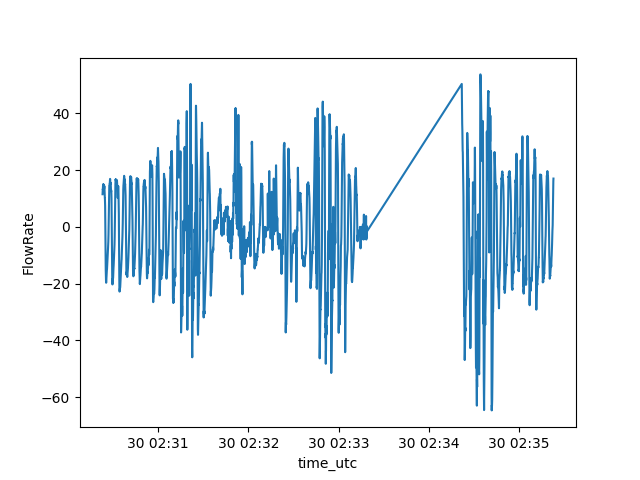
I do not know what exactly happened at this time. It is not a deliberate stopping machine because this should have been created a new session (thus, a new file). But it seems that this kind of error can happen. That is why event_data_to_dataframe() has mis_value_strategy parameter to deal with missing values. There are two possibilities at the moment : a NaN in a column can be ignore, i.e., the rows are not included in the result dataframe, or the NaN value can be replaced by a constant float (put any float value in the parameter dictionary). Here is an example of ignoring rows where CPAP_FlowRate is NaN.
df = event_data_to_dataframe(oscar_session_data=oscar_session_data,
                             channel_ids=[ChannelID.CPAP_FlowRate.value,
                                          ChannelID.CPAP_Obstructive.value,
                                          ChannelID.CPAP_ClearAirway.value],
                             mis_value_strategy={ChannelID.CPAP_FlowRate.value: 'ignore'})
print(df[df.ClearAirway.notnull()])
And the result :
                        time_utc  FlowRate  Obstructive  ClearAirway
84376  2022-01-30 03:06:37+00:00      0.48          NaN         16.0
113201 2022-01-30 03:25:50+00:00      1.20          NaN         11.0
116701 2022-01-30 03:28:10+00:00      9.36          NaN         12.0
238801 2022-01-30 04:49:34+00:00    -10.08          NaN         15.0
257626 2022-01-30 05:02:07+00:00      3.36          NaN         21.0
278876 2022-01-30 05:16:17+00:00      4.44          NaN         14.0
377026 2022-01-30 06:21:43+00:00     -0.96          NaN         15.0
391676 2022-01-30 06:31:29+00:00      1.92          NaN         13.0
Do not forget that the result of event_data_to_dataframe() is a pandas dataframe, so any dataframe
operation is accessible to organize data.
RawOscarDataset
If you are using the library Torch, the RawOscarDataset runs all these previous loading tasks for you. This class respect the simple interface of a Torch Dataset but load files only at will when the program access it. This could inscrease the time of treatment but limits the memory used.
Using a RawOscarDataset is simple:
dataset = RawOscarDataset(data_path='test/data/raw')
print(dataset[0])  # accessing the first element
and it produces, by default, two numpy arrays. The first one is the FlowRate and the second one represents the Apnea events:
(array([[39.96000159],
       [38.64000154],
       [38.16000152],
       ...,
       [18.00000072],
       [17.16000068],
       [15.60000062]]), array([[0.],
       [0.],
       [0.],
       ...,
       [0.],
       [0.],
       [0.]]))
The elements are ordered according the name of the files : dataset[0] contains data from the first file, dataset[1], from the second one and so on.
The RawOscarDataset class provides multiple parameters to control the output of the element. The first one is getitem_type. This parameter can force the class to output the element as numpy arrays (by default) or as a dataframe.
dataset = RawOscarDataset(data_path='test/data/raw', getitem_type='dataframe')
print(dataset[0])  # accessing the first element as dataframe
with the following result:
                                   FlowRate  Obstructive  ...  Apnea  ApneaEvent
time_utc                                                  ...
2022-01-30 02:09:19+00:00         39.960002          NaN  ...    NaN         0.0
2022-01-30 02:09:19.040000+00:00  38.640002          NaN  ...    NaN         0.0
2022-01-30 02:09:19.080000+00:00  38.160002          NaN  ...    NaN         0.0
2022-01-30 02:09:19.120000+00:00  36.840001          NaN  ...    NaN         0.0
2022-01-30 02:09:19.160000+00:00  34.200001          NaN  ...    NaN         0.0
...                                     ...          ...  ...    ...         ...
2022-01-30 06:35:21.800000+00:00  18.720001          NaN  ...    NaN         0.0
2022-01-30 06:35:21.840000+00:00  18.600001          NaN  ...    NaN         0.0
2022-01-30 06:35:21.880000+00:00  18.000001          NaN  ...    NaN         0.0
2022-01-30 06:35:21.920000+00:00  17.160001          NaN  ...    NaN         0.0
2022-01-30 06:35:21.960000+00:00  15.600001          NaN  ...    NaN         0.0

[397500 rows x 6 columns]
The channel_ids parameter allows the user to add some channel to get in place of CPAP_FlowRate. Note that all Events channels will be getting even if they are not specified in this parameter (see below). Moreover, this will work only with a dataframe. The numpy output produces, at the moment, only the output of the FlowRate. It will cause an exception if this channel is not given.
dataset = RawOscarDataset(data_path='test/data/raw',
                          getitem_type='dataframe',
                          channel_ids=[ChannelID.CPAP_Leak.value,
                                       ChannelID.CPAP_FlowRate.value])
print(dataset[0])  # accessing the first element with CPAP_Leak and CPAP_FlowRate
With the following result:
                                  Leak   FlowRate  ...  Apnea  ApneaEvent
time_utc                                           ...
2022-01-30 02:09:19+00:00          NaN  39.960002  ...    NaN         0.0
2022-01-30 02:09:19.040000+00:00   NaN  38.640002  ...    NaN         0.0
2022-01-30 02:09:19.080000+00:00   NaN  38.160002  ...    NaN         0.0
2022-01-30 02:09:19.120000+00:00   NaN  36.840001  ...    NaN         0.0
2022-01-30 02:09:19.160000+00:00   NaN  34.200001  ...    NaN         0.0
...                                ...        ...  ...    ...         ...
2022-01-30 06:35:21.800000+00:00   NaN  18.720001  ...    NaN         0.0
2022-01-30 06:35:21.840000+00:00   NaN  18.600001  ...    NaN         0.0
2022-01-30 06:35:21.880000+00:00   NaN  18.000001  ...    NaN         0.0
2022-01-30 06:35:21.920000+00:00   NaN  17.160001  ...    NaN         0.0
2022-01-30 06:35:21.960000+00:00   NaN  15.600001  ...    NaN         0.0

[397683 rows x 7 columns]
The parameter output_events_merged precise what kind of Events are merged into the ApneaEvent column (or the second array for the numpy output).
With all events included in the ApneaEvent column:
print(dataset[0][dataset[0].ApneaEvent != 0.0])
gives the result:
                                  Leak  FlowRate  ...  Apnea  ApneaEvent
time_utc                                          ...
2022-01-30 03:06:27+00:00          NaN      1.56  ...    NaN         1.0
2022-01-30 03:06:27.040000+00:00   NaN      3.96  ...    NaN         1.0
2022-01-30 03:06:27.080000+00:00   NaN      4.68  ...    NaN         1.0
2022-01-30 03:06:27.120000+00:00   NaN      3.72  ...    NaN         1.0
2022-01-30 03:06:27.160000+00:00   NaN      1.56  ...    NaN         1.0
...                                ...       ...  ...    ...         ...
2022-01-30 06:31:28.840000+00:00   NaN      1.92  ...    NaN         1.0
2022-01-30 06:31:28.880000+00:00   NaN      4.68  ...    NaN         1.0
2022-01-30 06:31:28.920000+00:00   NaN      4.80  ...    NaN         1.0
2022-01-30 06:31:28.960000+00:00   NaN      3.12  ...    NaN         1.0
2022-01-30 06:31:29+00:00          NaN      1.92  ...    NaN         1.0

[2008 rows x 7 columns]
You can note that are more events than when we loaded the file with event_data_to_dataframe(). Indeed, the RawOscarDataset completes the ApneaEvent with the medical definition of an apnea event. Since the events are marked at the end of the event, an internal function generate_annotations() marks all points 10 seconds before each event. Note that only the ApneaEvent column is completed. All other event columns are kept like the original data. At the moment, no parameter exists to change the behaviour of the annotation.
With only ApneaEvent representing Obstructive, using the parameter output_events_merged:
dataset = RawOscarDataset(data_path='test/data/raw',
                          getitem_type='dataframe',
                          channel_ids=[ChannelID.CPAP_Leak.value,
                                       ChannelID.CPAP_FlowRate.value],
                          output_events_merged=[ChannelID.CPAP_Obstructive.value])
print(dataset[0][dataset[0].ApneaEvent != 0.0])
gives the following result :
Empty DataFrame
Columns: [Leak, FlowRate, Obstructive, Hypopnea, ClearAirway, Apnea, ApneaEvent]
Index: []
No Obstructive event this night !
At last, we can see the number of elements in the dataset :
print(len(dataset))
gives
2